
Mobile app for meeting new friends (AI-supported)
UX Research | UX/UI Design
About the project
A mobile app project that helps users find people with common passions using AI algorithms for intelligent matching. The key challenge was to create an intuitive search and interaction system that meets the needs of people looking for communities around less popular interests.
The process began with user research - I conducted interviews, created personae and empathy maps, which allowed me to better understand the problems and expectations of the audience. Based on this, I designed a user flow minimizing the number of steps needed to make contact, then created lo-fi wireframes and conducted usability tests. Improvements made included streamlining the filter system, a clearer profile layout, and chat optimization.
The final UI Design was based on high-fidelity prototype testing, which helped refine interactions and make navigation smooth and intuitive. Thanks to AI, the app will effectively connect users, providing personalized matches and an engaging experience.
Used tools
Interviews (preceded by Pre-Screener and Screener), Persona, Empathy Map, User Journey Map, Ideation, Desk Research - market and competition analysis, UX analysis, User Scenario, User Flow, Paper prototyping, Low-fidelity wireframing, User testing, High-fidelity wireframe, Prototyping
Interviews with users
To better understand users' needs, I conducted in-depth interviews, preceded by preselection of participants using Prescreener and Screener. The interviews revealed that many people find it difficult to find company to spend time together, especially for less popular interests.
Persona
Based on the interviews, I created a persona.
Alexandra is 25 years old and lives in a large city. She often feels alone in her interests and lacks local events tailored to her passions. She has limited time to search for suitable communities and fears that even in groups with similar interests she will not find a common language with others.

Empathy map
The empathy map mainly shows how Alexandra perceives herself in the world around her. Alexandra, through lack of understanding and interest from others, feels undervalued. She lacks local events and groups that correspond to her unpopular hobbies, making it difficult for her to find suitable communities. Alexandra also fears that even in groups with similar interests, she will not find common ground with others. These challenges affect her satisfaction, social engagement and opportunities to pursue her passions.

User Journey Map
Based on the data collected, I was able to create a user journey map (user map) for Alexandra. Alexandra's greatest frustrations are experienced at the community-finding stage, where she browses Facebook groups and local events, but the lack of relevant communities for her unpopular hobbies exacerbates feelings of loneliness. Another difficult stage is meeting new people, when she wants to express opinions and gain knowledge, but often feels unappreciated and misunderstood. The final critical moment is the exchange of ideas at meetings and events, where she wants to build relationships but encounters difficulties in finding people with similar passions and fears she will not fit into the group, leading to feelings of isolation.

Ideate
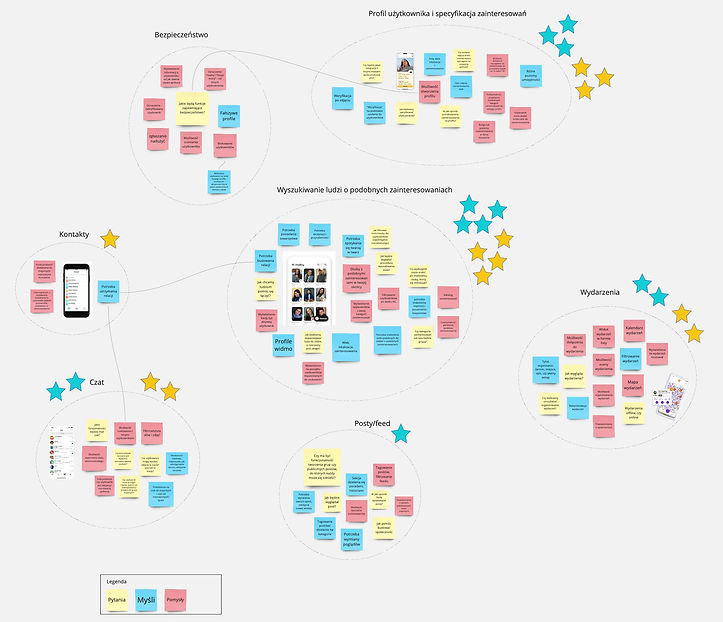
Ideation focused on ideas for features that would solve problems for Alexandra and people similar to her. A key part of the solution was a feature using artificial intelligence to find people with similar interests. Ideation was made with the help of the Miro tool.
.jpg)
Desk research
By analysing the market, it was possible to identify competing products offering similar features. This research identified which functions could be adapted to the designed solution and which elements required a unique approach.

UX analysis
The UX analysis made it possible to assess which solutions in competing products best address the design problem. For each function of the product being designed, counterparts of that function in competing solutions were matched. The selected functions were analysed, allowing us to see which functions perform best and why. This helped to select best practices and adapt them to the project.
User Scenario
Analysis of Aleksandra Kowalska's user story indicated that the app effectively satisfies her need to establish relationships with people with similar interests, especially after a long day at work when she feels lonely. Artificial intelligence plays an important role in this, helping her to find the right users quickly and efficiently, which creates positive emotions and increases engagement. Alexandra appreciates the detailed profiles of users, which suggests that personalisation of profiles and matches should be developed to facilitate more tailored interactions.
User flow
A detailed user flow was designed for the main function of the app - searching for people with similar interests. It was particularly important to minimise the steps and provide a clear path to make it easier for users to use this function.

Paper prototype and Lo-Fidelity wireframe
Before the application design stage in Figma, initial sketches and prototypes had to be created. Sketches were created - paper prototypes from which a more structured prototype could be created electronically. This made it possible to see the structure of the application in a comprehensible way.


User testing
In order to test the Low-Fidelity Wireframe, a usage scenario was prepared, which included the main and basic tasks. The aim was to test whether users understood the product and were able to find their way around it. What attracts their attention and what makes navigation difficult was analysed. The user tests carried out allowed improvements to be made to the product, making the application even more comprehensible to potential users.
Hi-Fidelity wireframe
The next step was to create high-fidelity wireframes in Figma. These more advanced prototypes provided the opportunity for further user tests and necessary improvements.

UI Design
Based on previous apliaction sketches and user suggestions, I designed the app's interface. Key features were added, such as AI-assisted friend search, chat, an events tab and the ability to edit a profile. Each element of the interface was designed with the users' needs in mind.


Prototyping
The project was completed with the creation of an interactive prototype that realistically represented the operation of the application. This allowed for final testing of the application's functions and valuable user feedback, which influenced final adjustments before the product was implemented.


Podsumowanie
The project began with the idea of creating an app to help users find people with similar interests. After interviewing a select group of users, key issues were identified, which allowed a better understanding of needs and the creation of a persona - Alexandra. Based on the research, empathy maps, user journey map, user scenario and user flow were created to help understand how users would use the designed app. Specific features of the app were then developed, such as searching for friends using AI. Testing was carried out on paper prototypes and later on high-fidelity wireframes, which allowed the product to be refined in terms of intuitiveness and meeting user expectations. The project culminated in the creation of a final interactive prototype, ready for deployment.


